Deposit Methods
This page gathers the whole process of depositing funds and withdrawing your winnings in one place: minimum amounts, processing times, daily ceilings and fee details for cards, e-wallets, crypto and bank transfer, presented side by side.

Cashier · Finance Panel
2 USD
Min. DepositInstant
Card · Wallet · Crypto24/7
Request Processing- Min. deposit
- 2 USD equivalent · varies by method
- Deposit time
- Instant · bank transfer 1–3 business days
- Min. withdrawal
- 1 USD equivalent
- Max. withdrawal
- 60,000 USD equivalent
- Fastest withdrawal
- Crypto · 15 min – 1 hour
- Crypto networks
- Solana · TRC20 · BEP20 · ERC20 · L2 · BTC
- Withdrawal rule
- Back through the deposit method, split proportionally
- Fees
- Usually covered by the operator · Bitcoin fee-free




How Does the Cashier Screen Work?
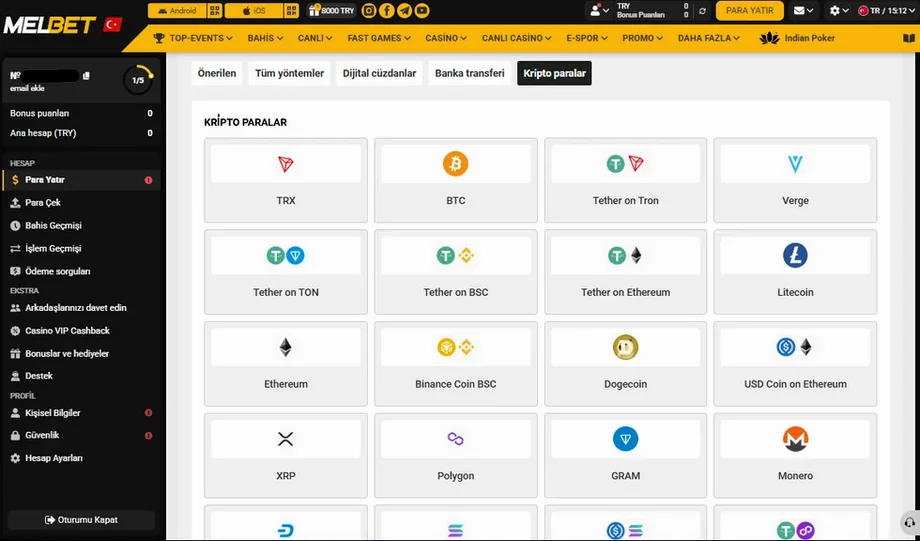
The finance panel is managed from a single screen. The Deposit and Withdraw links in the left menu sit in the same section as your transaction history and payment queries. That means you never have to switch to a separate page to track deposits and balance movements.
What Do the Tabs Mean?
Methods are split across five tabs. The Recommended tab is sorted by your past transactions, so the list you see on first login changes over time. All methods shows every channel open to your account in one list.
The remaining three tabs are grouped by channel type: E-wallets, Bank transfer and Cryptocurrencies. Instead of scanning the long list from top to bottom, you can jump straight to the tool you actually use.
What Do the Transaction Statuses Mean?
Every request creates an entry in the transaction history the moment it is submitted, and each entry carries a status label. Knowing these labels tells you whether to wait or act when a transfer is delayed.
| Status | Meaning | What to do |
|---|---|---|
| Pending | Request received, not yet through internal review | Wait; a withdrawal can still be cancelled |
| Processing | Forwarded to the payment provider | Cannot be cancelled; check the timing table |
| Completed | Amount sent to the receiving side | For crypto, track it on-chain via the TXID |
| Rejected | A mismatch was found during review | Read the reason message and open a query |
Transaction History and Payment Queries
The payment queries section is reserved for unresolved transactions. A ticket opened with the request number lets the support team see the transaction directly, so having the number ready before describing the problem shortens the process.
Deposit Methods
There are four main deposit channels: bank cards, e-wallets, cryptocurrencies and bank transfer. The effect on your balance is the same with all of them; the differences lie in speed, limits and availability on the withdrawal side. The table below lets you compare deposit thresholds at a glance.
| Channel | Credited | Minimum | Ceiling |
|---|---|---|---|
| E-wallet | Instant | 2 USD equivalent | By country and method |
| Binance Pay / BybitPay | Instant | 2 USD equivalent | By country and method |
| AstroPay | Instant | 2 USD equivalent | By country and method |
| Bank card (Visa, Mastercard) | Instant | 2 USD equivalent | By country and method |
| Cryptocurrency | Instant | 2 USD equivalent | By country and method |
| Bank transfer | 1–3 business days | 2 USD equivalent | By country and method |
The general floor is the equivalent of 2 USD; however, each channel has its own threshold and it varies by country. Always read the current value in the info line under the method card. In rare cases, depending on the payment system or your bank, a transfer can stretch from a few minutes to a few hours.
Payment system fees are usually covered by the operator; in rare cases the cost may be passed on to the user. Bitcoin transactions are fee-free in every case. Your wallet provider or bank may still apply its own charge or exchange margin; that amount is not shown in the cashier and must be checked against the total on the sending side.
Bank Cards (Visa and Mastercard)
The most familiar method is the bank card, and deposits usually complete instantly. The card must be enabled for 3D Secure verification; otherwise the bank declines the transaction. The cardholder's name must also match the account holder's name exactly, because mismatched transactions get flagged for review.
An approved card transaction hits the balance within seconds, which makes it practical during live betting.
Card withdrawals depend on the banking calendar and may not be open in every region. Availability shows in the cashier.
If your bank offers a virtual card feature, you can transact without sharing your real card number.
E-Wallets
Wallets settle within minutes for both deposits and withdrawals, which is why most regular players prefer this channel. They also add a layer of privacy, since you never share your card details directly.

Cryptocurrencies
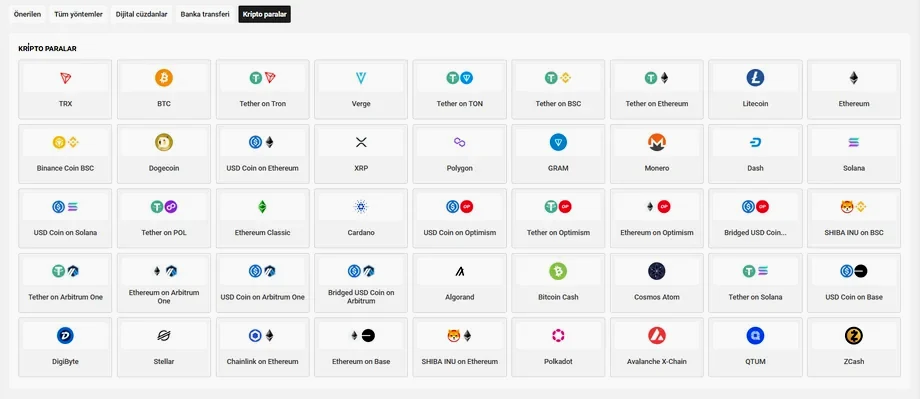
Crypto is the widest group of options. Alongside major networks like Bitcoin and Ethereum, more than forty assets are listed, including Tether (USDT), USD Coin, Litecoin, XRP, Solana, Cardano and Monero. Different network versions of the same asset appear as separate cards — USDT on TRC-20, for instance, is shown apart from its Ethereum version.
Bank Transfer
Transfers (SEPA/SWIFT) suit high-value transactions, because their single-transaction ceiling is the highest among the fiat channels. On the other hand, approval depends on banking hours; requests opened outside business hours or on weekends settle on the next business day.
Regional Options
Depending on the region your account is registered in, the list may also show cards open only to that market: local e-wallets, instant bank transfer services, prepaid vouchers and mobile payment solutions. These cards are added or hidden automatically; their limits may also differ from the table above, so read the values under the card before entering an amount.
Providers and Supported Assets
The two tables below detail the providers and crypto assets you will meet on the deposit screen. Timing and fee data lives in the network table alone, so you never see the same figure differ from one place to another.
E-Wallet Providers
| Provider | Standout feature |
|---|---|
| Payurus | Multi-currency support |
| MoneyGO | Fast account verification |
| MoneyGO USD | Dollar-based balance, avoids double conversion |
| Binance Pay | Direct transfer from your exchange balance |
| BybitPay | Integrates with your crypto wallet |
| ecoPayz | International acceptance, wide country coverage |
| AstroPay | Prepaid-card logic; may not be usable for withdrawals |
Speed should not be the only criterion when choosing a wallet. The provider runs its own verification process too, so using a service where you already hold an account shortens the total time. With prepaid tools, withdrawal is usually impossible, so you will need a second channel for your winnings.
Supported Crypto Assets
| Asset | Supported networks |
|---|---|
| Tether (USDT) | Tron · BNB Smart Chain · Ethereum · TON · Solana · Polygon · Arbitrum |
| USD Coin (USDC) | Ethereum · Solana · Base · Arbitrum · Optimism |
| Bitcoin (BTC) | Bitcoin mainnet |
| Ethereum (ETH) | Ethereum · Base · Arbitrum · Optimism |
| XRP · Solana · TRON · BNB | Their own mainnets |
| Litecoin · Dogecoin · Cardano · Monero | Their own mainnets |
| Dash · Stellar · Algorand · Cosmos · Avalanche · Polkadot · ZCash · QTUM · DigiByte · Bitcoin Cash · Chainlink · Polygon | Their own mainnets |
Because a single asset can be offered on several networks, the network name matters as much as the asset name when you choose. This is exactly where the most common transfer mistake happens; see the network table below for timing and fee differences.
How to Make a Deposit
The flow is the same for every method and usually takes less than a minute. The steps below outline what happens, in order, for a user making their first deposit.
The cashier is reachable from both the app and the browser; the screen layout is identical. If biometric login is enabled, the password step is skipped.
Go there via the left menu or the shortcut in the top bar. Then pick one of the method tabs.
The minimum and maximum values are printed under the card. If the amount you enter falls outside that range, the confirm button stays disabled.
Cards ask for a 3D Secure code, wallets for provider approval, and crypto for a transfer to the generated address.
With instant methods the amount appears right away. If there is a delay, follow the request status in the transaction history.
What to Watch on Your First Deposit
Trying the first transfer with a small amount makes sense; that way you confirm your chosen channel works smoothly before committing a large transfer. Picking the right account currency from the start also matters, because sending in a different currency triggers a conversion on both your bank's side and the operator's side.
If you plan to join a promotion, read the terms before depositing: some promotions exclude certain channels. The details are collected on the bonus terms page.
I Deposited but It Never Arrived
A deposit not showing in your balance rarely means the money is lost; in most cases the transaction is simply waiting at some stage. First read the status in your transaction history, then apply whichever of the cases below matches yours.
The bank took the money, the balance did not grow
With card transactions there can be a short gap between authorization and settlement. Fix: wait a few minutes first; if it persists, contact support with the receipt or a screenshot.
Reference field missing on a transfer
If the reference code you were given is not included with a bank transfer, the payment cannot be matched and waits for manual processing. Fix: attach the receipt to your query; supplying the code afterwards speeds up matching.
Crypto transfer not showing
The balance does not update until network confirmation completes. Fix: take the TXID from your wallet and check the confirmation count in a block explorer; if confirmations are complete, open a query with the TXID.
Sent over the wrong network
A transfer sent from the ERC20 network to a TRC20 address will not match. Fix: open a support ticket with the TXID immediately; recovery is sometimes possible within the same network family, but it is not guaranteed.
Amount below the minimum
Transfers under the floor may not be credited. Fix: verify the channel's minimum in the table and open a query rather than trying to top up the difference.
The bank blocked the transaction
Some banks stop cross-border payments under their own rules; the amount is refunded to the card within a few business days. Fix: do not retry with the same card until the refund appears — switch to a wallet or crypto channel.
When opening a query, include the date, amount, method and, if available, the TXID or receipt number. Those four pieces of information are enough to match the transaction with the payment provider's records.
Withdrawal Methods and Times
Withdrawal is one step longer than depositing: the request first passes internal review, then goes to the payment provider. The times below are the total of those two stages; most delays come from incomplete verification.
| Channel | Approval time | Minimum | Ceiling |
|---|---|---|---|
| Cryptocurrency | 15 min – 1 hour | 1 USD equivalent | 60,000 USD equivalent |
| E-wallet | 15 min – 24 hours | 1 USD equivalent | 60,000 USD equivalent |
| Payment systems | 15 min – 24 hours | 1 USD equivalent | 60,000 USD equivalent |
| Mobile payment | Instant – 24 hours | 1 USD equivalent | 60,000 USD equivalent |
| Bank card | 1–7 business days | 1 USD equivalent | 60,000 USD equivalent |
| Bank transfer | 2–7 business days | 1 USD equivalent | 60,000 USD equivalent |
The general floor is the equivalent of 1 USD, and the ceiling is the equivalent of 60,000 USD. Even so, your chosen channel may set a higher threshold of its own — 1 USD is not withdrawable through every method. Requests are processed around the clock, but bank-based channels follow the banking calendar.
The fastest route is crypto: it settles within 15 minutes to 1 hour. Cards and bank transfers move in business days, which makes them the slowest options.
The Closed-Loop Rule
Funds leave through the same channel they came in by. In practice this is a restriction, and it can be annoying when not planned for. So deposit through the channel you also want your winnings on; for example, if you deposit with a prepaid card, you will need to register a second method for withdrawals.
If you deposited through several methods, your withdrawal request is split across them in proportion to your deposits. In other words, if you funded the account from three channels, do not expect one lump-sum payout — the system distributes the amount automatically.
Cancelling a Pending Request
If the request has not yet been handed to the provider — that is, its status is "pending" — it can be cancelled, and the amount usually returns to your balance within an hour. Once the status changes to "processing", it cannot be recalled.
Crypto Networks: Timing and Fees
A separate wallet address is generated for each account on every network, and that address belongs to that account alone. Once you save the address, you never have to look it up again for later transactions.
Why Network Choice Is Critical
The same asset exists on multiple networks, and the networks are not compatible with each other. Before sending, double-check that the network in your wallet matches the network in the cashier. The values below are technical properties of the networks themselves; the operator-side crypto withdrawal time is 15 minutes to 1 hour.
| Network | Typical confirmation | Approx. network fee | Best suited for |
|---|---|---|---|
| Solana | 1–3 min | Under 1 USD | Small, frequent transfers |
| Tron (TRC20) | 5–15 min | Around 1 USD | Everyday transactions |
| BNB Smart Chain (BEP20) | 5–15 min | Under 1 USD | Exchange wallet transfers |
| Arbitrum · Optimism · Base | 5–15 min | Around 1 USD | Ethereum alternative |
| Ethereum (ERC20) | 15–30 min | 3–15 USD when busy | Transfers above 500 USD |
| Bitcoin mainnet | 20–40 min | Depends on congestion | Large amounts |
The practical takeaway from these figures: sending a 100 USD transfer over the Ethereum mainnet can cost up to a tenth of the amount in fees. The same transaction completes for pennies over Tron or Solana.
The Address-Checking Habit
After copying an address, visually compare the first and last four characters. Clipboard-hijacking malware strikes at exactly this point. Sending a small test transfer before a large one also greatly reduces the risk of loss.
Currency, Conversion and Personal Limits
Which Currency Should You Choose?
USD, EUR and selected local currencies are available as account currencies. The currency is chosen when the account is opened; changing it later requires a support request. That makes the initial choice important.
The way to avoid double conversion is to match the currency of your sending instrument to your account currency. For example, sending from a dollar-balance wallet to a dollar account creates no exchange spread. Across different currencies, conversion happens at the rate at the moment of the transaction, and your bank may apply its own margin on top.
Setting a Personal Deposit Limit
In the responsible gaming section of your account settings you can set a daily, weekly or monthly deposit ceiling. The limit takes effect immediately; requests to raise it are subject to a cooling-off period, because lifting the cap on impulse would defeat its purpose. Defining your budget up front is far more effective than trying to rein it in afterwards.
Withdrawal Problems: Causes and Fixes
Withdrawal requests rarely get stuck, and when they do, the cause usually falls under a handful of headings. The list below covers the most common situations and their practical fixes.
Verification incomplete
Identity verification is mandatory before the first withdrawal. If documents are missing, the request is automatically placed on hold. Fix: finish verification right after opening your account.
Active bonus wagering
Opening a withdrawal while a promotion's wagering is still running resets the bonus balance. Fix: check your wagering progress in the panel first.
Different channel requested
A withdrawal requested through a method other than the one you deposited with is rejected. Fix: use the incoming channel first.
Name mismatch
The name on the payment instrument must match the account holder's name. Fix: never use a third party's card or wallet.
Wrong network selected
In crypto withdrawals, if the destination wallet's network differs, the transfer never shows up. Fix: verify the address and the network together; run a small test first if needed.
Limit exceeded
Requests above the daily ceiling are processed in parts. Fix: split the amount to fit the cap, or pick a channel with a higher limit.
Provider maintenance
Wallet services occasionally go into scheduled maintenance and the card temporarily disappears from the list. Fix: wait a few hours or use an alternative channel.
If your issue is not on this list, write to live support with the request number. Because the support team can see the transaction record, queries are usually resolved the same day.
Payment Security and Verification
Financial transactions are protected by several independent layers. Knowing these layers helps you understand an unexpected verification request and close the gaps on your own side.
Transfer and Infrastructure Security
The connection is encrypted with the current TLS version, so no one in the middle can read the data. Card details are processed not by the operator but on the side of certified payment providers. That separation has a practical consequence: your card number is never stored in the system the transaction passes through.
Identity Verification (KYC)
Before a withdrawal you may be asked to verify personal details: name, surname, date of birth and the like. Extra verification steps can come up on the first withdrawal; what is requested depends on your account status and your region. Once the process is completed, later requests are handled much faster.
When uploading documents, use a legible, uncropped image. Most rejected submissions are caused not by fraud but simply by a clipped corner or flash glare. For card confirmation you may mask the middle digits, leaving only the first six and last four visible.
Precautions on the Account Side
Even if your password is compromised, no one can log in without the second step. Setup takes a minute.
If offered in the security settings, enable it; anyone who gets into the account cannot move funds without the PIN.
You get an alert on every new-device login. If you see a login you do not recognize, change the password immediately.
Do not reuse a password from other sites; leaked lists are tried automatically.
Why Extra Verification Happens
When a request falls outside your usual pattern, an additional confirmation step may kick in. So the first time you withdraw a large amount, you may face verification you did not expect; the transaction is not rejected — it is being confirmed.
Recognizing Fraud Attempts
Fake support accounts are the most common threat. The real support team never asks for your password, your full card number or a verification code. Likewise, "let's double your balance" messages and payment requests via unofficial links should be refused in every case.
Never share your payment details with third parties. If you receive a suspicious request, stop the transaction and confirm directly through the in-app support channel.
Which Method Should You Choose?
The deposit decision comes down to three things: which instrument you already have, how much of a hurry you are in, and what amounts you work with. The two profiles below speed up the choice.
▶ If speed is your priority
- Crypto: withdrawals in 15 minutes – 1 hour
- Solana and TRC20: network confirmation within minutes
- E-wallet: 15 minutes – 24 hours
▶ If you move large amounts
- Ceiling of 60,000 USD equivalent
- Bitcoin: fee-free in every case
- Bank transfer: the common pick for big sums
A Practical Rule of Thumb
If you already hold an e-wallet account, start there: both deposits and withdrawals run through the same channel, and the closed-loop rule never gets in your way. If you have no wallet but use crypto, USDT on TRC-20 makes sense for everyday amounts and Bitcoin for transfers above 500 dollars. If all you have is a bank card, deposit by card — but register a second channel for withdrawals in advance.
Frequently Asked Questions
Deposit Amounts and Fees
What is the minimum deposit amount?
The general floor is the equivalent of 2 USD. Each channel has its own threshold, though, and it varies by country; you can see the current value in the info line under the method card in the cashier.
What is the maximum deposit amount?
The ceiling is not a single fixed value; it depends on your country and the chosen method. Check the range printed under the card before entering an amount.
How long does a deposit take to arrive?
Bank card, e-wallet and crypto deposits are processed instantly and the balance updates right away. Bank transfers take 1–3 business days. In rare cases a delay of a few minutes to a few hours can occur, depending on the payment system.
Are there any transaction fees?
Payment system fees are usually covered by the operator; in rare cases the cost may be passed on to the user. Bitcoin transactions are fee-free in every case. Your wallet provider or bank may still apply its own charge.
Which crypto network is the cheapest?
Solana and BNB Smart Chain usually stay under 1 USD, and Tron sits around 1 USD. The Ethereum mainnet becomes noticeably expensive during congestion, so it is a poor fit for small amounts.
Withdrawal Times and Limits
I made a deposit but it never reached my balance — what should I do?
Wait a few minutes first and check the status in your transaction history. For crypto, use the TXID to check the number of network confirmations. If the problem persists, contact support with the date, amount, method and the TXID or receipt number.
How long does a withdrawal request take to be approved?
Crypto withdrawals take 15 minutes to 1 hour, e-wallets and payment systems 15 minutes to 24 hours, mobile payments instant to 24 hours, bank cards 1–7 business days, and bank transfers 2–7 business days. Requests are processed around the clock.
Can I withdraw to a different channel than the one I deposited with?
No, withdrawals go back through the method you deposited with. If you used several methods, the withdrawal amount is split across them in proportion to your deposits.
What are the withdrawal limits?
The general floor is the equivalent of 1 USD and the ceiling is the equivalent of 60,000 USD. Your chosen channel may set a higher threshold of its own, so the lowest amount does not apply to every method.
Verification, Security and Issues
Is verification required for withdrawals?
Before a withdrawal you may be asked to verify personal details (such as your name, surname and date of birth). Extra verification steps can come up on the first withdrawal; what is requested depends on your account status and your region.
Can I cancel a pending withdrawal request?
If its status is "pending" it can be cancelled and the amount returns to your balance. Once the status changes to "processing", the request has been handed to the payment provider and cannot be recalled.
I sent crypto over the wrong network — can my funds be recovered?
Open a support ticket with the TXID immediately. Recovery is sometimes possible between networks of the same family, but it is never guaranteed; that is why checking the network before sending is critical.
Are my card details safe?
Card data is processed on the side of certified payment providers and the connection is encrypted with the current TLS version. Enabling two-factor authentication is recommended for extra protection.
Can I set a deposit limit?
Yes. In the responsible gaming section of your account settings you can define a daily, weekly or monthly ceiling. The limit takes effect immediately; requests to raise it are subject to a cooling-off period.
Can I withdraw while bonus wagering is in progress?
When you open a withdrawal, any bonus balance with unfinished wagering is reset; your main balance is not affected. The details are explained on the bonus page.
Gambling carries a risk of addiction. Before depositing, set a daily or monthly limit in your account settings and play only with money you can afford to lose. For professional help, reach out to BeGambleAware or GamCare.
About the Editor